
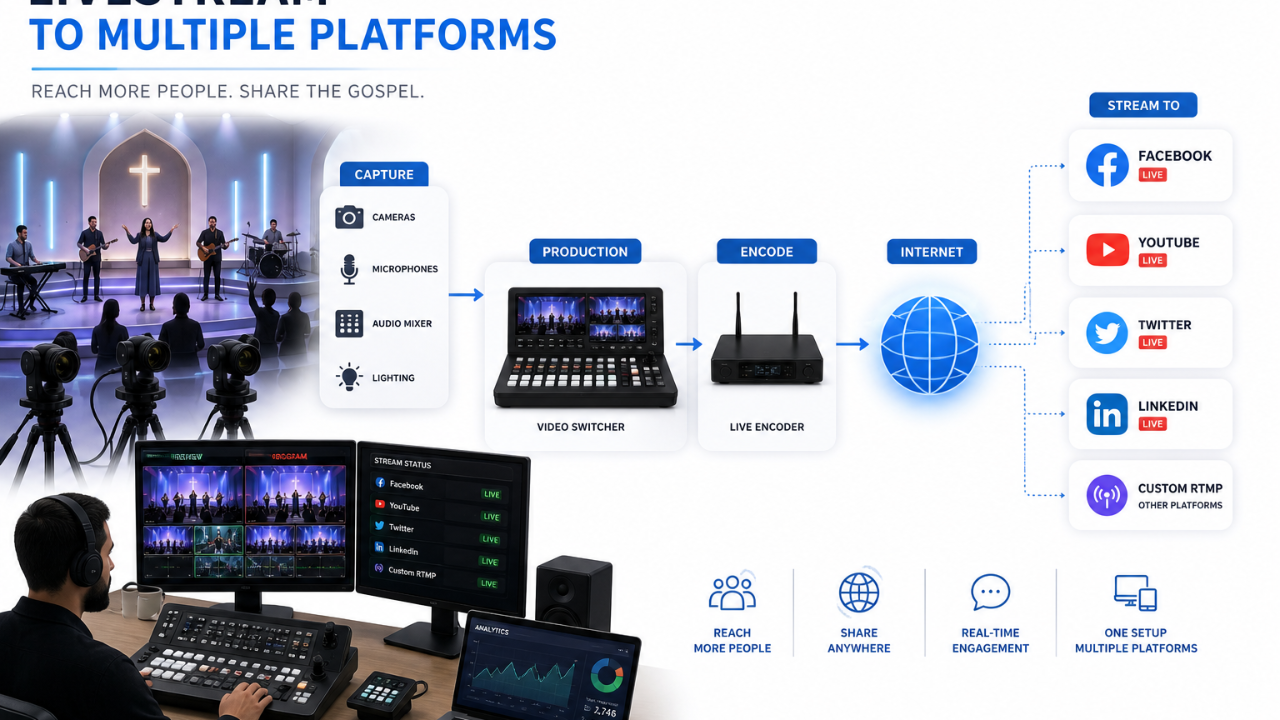
How to Livestream a Church Service to Multiple Platforms at Once
Sep 03, 2026Livestream a church service to multiple platforms at once. That's the goal for most churches today.
Your congregation doesn't watch in one place. Some use YouTube. Some use Facebook. Some expect your church website.
This guide explains what that actually means, why it matters, and how to set it up. No jargon left unexplained.
What Is a Church Livestream?
A church livestream is a live video broadcast of your service. It goes out over the internet in real time. People who aren't in the building can watch and take part as it happens.
This is different from posting a video after the fact. A livestream happens live. That's what makes equipment and internet reliability so important.
Why Does Reaching Multiple Platforms Matter?
Livestreaming to multiple platforms at once is also called multistreaming or simulcasting. It means one broadcast reaches several destinations at the same time.
Dacast's guide on multi-destination streaming describes this as sending one high-quality stream into a service. That service then copies it out to every platform you've set up.
For a church, this solves a real problem. Not everyone watches in the same place. Multistreaming means you don't have to pick just one audience.
How Does Multistreaming Actually Work?
Multistreaming works through a relay. You send one stream to a service. That service copies it and pushes it out to each platform.
Church Visuals' guide on multistreaming explains that cloud-based platforms handle this through their own network of servers. You don't need extra bandwidth or expensive gear on your end.
Two approaches exist. Here's the difference.
- Cloud-based relay services take one stream from you and copy it out from their own servers. Your church's internet only carries one upload, not several.
- Local multi-output software uploads a separate copy to each platform straight from your own computer. This works, but it takes far more processing power and upload speed.
Most churches do better with the cloud-based approach. It doesn't strain your building's internet connection the way multiple uploads would.
What Do You Need to Multistream Your Church Service?
Multistreaming needs a few specific pieces. Here's what to have in place.
- An encoder or streaming software that supports RTMP or SRT output. Nearly every platform accepts one of these two formats.
- A multistreaming service or cloud relay that takes your one feed and sends it to every destination. You connect to the service once, not to each platform separately.
- Stream keys for every destination you want to reach. These go into your multistreaming service's dashboard, not your encoder.
- Enough upload speed for one strong stream. The relay service handles the rest from there.
This is separate from your core camera and audio setup. We cover that in full in Church Livestream Equipment Checklist.
Not sure your setup can actually support multistreaming? Book a free consultation and we'll help you figure out what's missing.
How Do You Set Up Multistreaming for Your Church?
The setup process stays mostly the same no matter which service you pick.
- Choose a multistreaming service or church-specific platform: BoxCast, a platform built for churches, is worth knowing. Reaching multiple destinations from one broadcast is core to what these platforms do.
- Connect your encoder to the service: Use the RTMP or SRT URL and stream key the service gives you. You only enter this once.
- Add each destination inside the dashboard: Paste in your YouTube and Facebook stream keys there, not in your encoder.
- Test everything before your service: Confirm every platform is actually receiving the stream. Check that audio and video stay in sync.
- Go live once: The relay service handles the rest.
If ProPresenter is part of your setup, connecting it into this workflow is its own step. We cover that in a separate guide.
Frequently Asked Questions
Do I need expensive equipment to multistream my church service?
No. Many services work with free software like OBS Studio. A standard camera works too. The multistreaming service handles distribution, not your hardware.
Will multistreaming slow down my church's internet connection?
Not with a cloud-based relay. You send one stream. Their servers handle the rest. Your upload only needs to support one stream, not several.
Can I multistream for free?
Some services offer free tiers. These often limit how many platforms or hours you get per month. Compare the limits against your actual weekly needs.
What's the difference between multistreaming and posting a video afterward?
Multistreaming happens live, to every platform at once. Posting afterward means your online congregation can't watch or engage during the actual service.
Does multistreaming hurt video quality?
Not with a cloud-based relay service. Quality problems mainly show up with local multi-output methods, since those split your computer's resources across several uploads at once.
Don't miss a beat!
New moves, motivation, and classes delivered to your inbox.
We hate SPAM. We will never sell your information, for any reason.